BUYING GUIDE · CANADA
USB-C Hub vs Thunderbolt Dock: Choose by Your Laptop and Screens
A USB-C plug tells you what fits. It does not tell you how many screens will work, whether the laptop will charge, or how quickly files will copy. Start with the exact computer, then choose the connection method.
The choice for your situation
For travel and one screen, start with a compact hub. For a permanent desk with charging and native video, check a Thunderbolt dock against the laptop’s display limits. For office screens on a machine with limited native outputs, investigate DisplayLink and its software requirements. Buy the least complex option that supports your complete setup.
What you are actually buying
| Exact example | Video path | Laptop charging | Deciding limitation |
|---|---|---|---|
| BENFEI 7-in-1, grey | One HDMI screen; up to 4K 30 Hz | Up to 60 W pass-through; charger separate | Host must support USB-C video; 4K 30 Hz is a tradeoff for desktop motion |
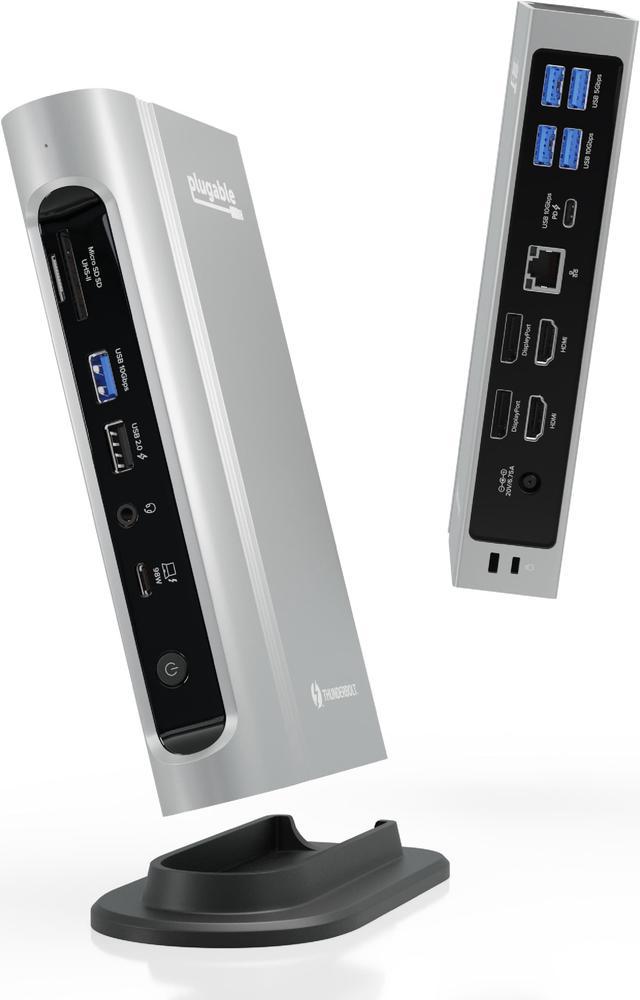
| Plugable TBT4-UDZ | Native video; screen count depends on host | Up to 100 W; 98 W certified | No downstream Thunderbolt port or USB-C display output |
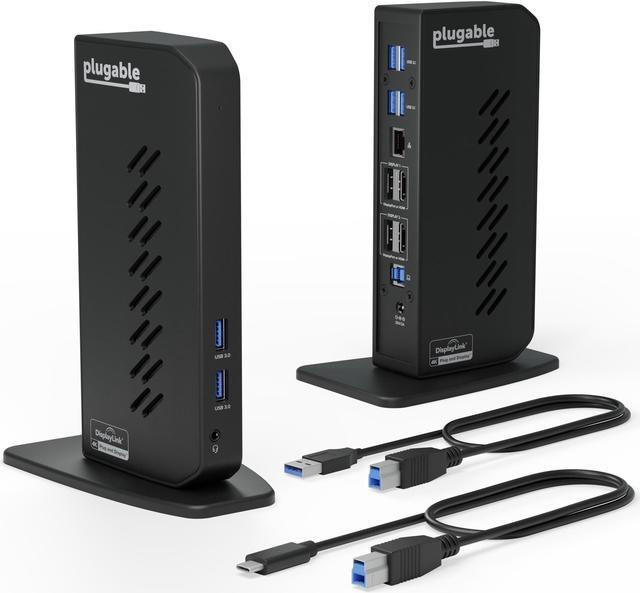
| Plugable UD-6950Z | DisplayLink; two displays up to 4K 60 Hz | No laptop charging | Software required; intended for productivity, not gaming |
A specification-based comparison, without lab testing. Recommendations below are our analysis of published characteristics.
Write down the laptop and monitor models first
Make a short list: exact laptop model and processor, operating system, available ports, each monitor’s resolution and target refresh rate, and the laptop charger’s wattage. Decide whether the laptop screen will stay open. This turns a vague search for a ‘dual-monitor dock’ into a compatibility check.
Do not count sockets as independent displays. On the TBT4-UDZ, compatible Windows Thunderbolt 4/USB4 hosts can drive up to four screens, while base M1/M2 Macs are limited to one. Other Macs and connection modes have different limits; check the current manufacturer matrix for the exact configuration.
Choose native video or DisplayLink deliberately
Native video uses the computer’s display capabilities. DisplayLink adds a USB graphics path with software. If the laptop already supports the screens you need, a native connection keeps that path straightforward. If it does not, verify DisplayLink support before paying for a more expensive native dock that still cannot add the missing display.
Plugable does not recommend the UD-6950Z for gaming or HDCP-protected playback. For a gaming screen, investigate a direct GPU connection first and check resolution, refresh rate and adaptive-sync support end to end. For an office computer, confirm that your organization permits the required display software.
Native video still has limits: Plugable does not officially support refresh rates above 60 Hz, HDR or adaptive sync on the TBT4-UDZ. A 180 Hz gaming monitor therefore needs a separately verified video path to retain those features.
Price the complete desk, including charging
A pass-through power socket still needs a suitable charger. A dock with a power adapter does not necessarily charge the laptop: the UD-6950Z is an example. Check the delivered power against the laptop’s needs under your actual workload; do not assume a gaming laptop can retire its original high-power adapter.
Compare dock + charger if needed + host cable + monitor cables or active adapters + shipping. Confirm the return policy before ordering. A lower sticker price is unhelpful if one screen needs another adapter or the computer cannot use the advertised connection.
Exact models and Canadian offers
Newegg prices come from refreshed offers. A missing offer does not confirm an out-of-stock product. Check seller, shipping, tax and returns before buying.

Travel and one screen
BENFEI USB-C Hub 7-in-1 — Grey
A compact starting point when portability matters more than a permanent multi-screen desk.
Check: Exact grey 7-in-1 version; 4K 30 Hz and separate charger. Confirm host video support.
Exact model specifications

Affiliate links. We may earn a commission from qualifying purchases.
Native workstation connection
Plugable Thunderbolt 4 Dock — TBT4-UDZ
Consider this when charging, wired networking and compatible screens should meet at one desk connection.
Check: Exact laptop display matrix and required ports. TBT4-UDZ is different from TBT4-UD5.
Exact model specificationsAffiliate links. We may earn a commission from qualifying purchases.
Office displays over USB
Plugable Dual 4K Display Docking Station — UD-6950Z
A different route when native display limits get in the way of a productivity setup.
Check: DisplayLink software, OS support and your existing charger. This is UD-6950Z, not a charging PDH version.
Exact model specificationsAffiliate links. We may earn a commission from qualifying purchases.
Questions before buying
Will any USB-C dock work with my laptop?
No. Match the required video protocol, operating system, power and screen limits. A physically compatible connector is only the first check.
Should I buy a dock just to add a mouse and keyboard?
Usually start by checking a simple data hub. Pay for video and laptop charging when you need those functions; they add compatibility questions as well as cost.
Does 4K support mean 4K at my preferred refresh rate?
No. Read the resolution and refresh rate together for the chosen port and number of screens. A 4K 30 Hz adapter and a 4K 60 Hz dock are different purchases.
Sources and method
Manufacturer sources checked September 5, 2026. Specifications apply to the named versions; check current computer and product documentation before ordering. Products are not ranked by commission, and we do not claim to have measured their performance.