BUYING GUIDE · CANADA
Steam Deck & ROG Ally SSD Upgrades: 2230 or 2280?
Before comparing capacity or price, identify your handheld. The original ROG Ally and the Ally X do not use the same SSD length. This guide separates physical fit from buying advice, then links to exact drives already in the GPUStores catalogue.
The choice for your situation
Steam Deck LCD/OLED and the original ROG Ally use the short 2230 format. Ally X and the ROG Xbox Ally models use 2280. For a compatible 2230 device, compare MP44S 1 TB with 2 TB according to the games you want to keep installed. MP44L 1 TB is a 2280 alternative to investigate for a 2280 device; it is not a substitute for a 2230 drive.
Which SSD length does your handheld use?
| Device | SSD format | Buying implication |
|---|---|---|
| Steam Deck LCD | Single-sided M.2 2230 | Use the LCD repair guide; a 2280 drive is too long for the original mounting position |
| Steam Deck OLED | Single-sided M.2 2230 | Use the OLED repair guide; its disassembly differs from LCD |
| Original ROG Ally (RC71) | M.2 NVMe 2230 | Choose the short drive; do not follow an Ally X shopping list |
| ROG Ally X (RC72) | M.2 NVMe 2280 | Compare 2280 drives; confirm clearance and the selected SSD’s suitability |
| ROG Xbox Ally / Xbox Ally X | M.2 NVMe 2280 | These later models differ from the original Ally; use their own service instructions |
A specification-based comparison, without lab testing. Recommendations below are our analysis of published characteristics.
2230 and 2280 describe size, not a speed ranking
A 2230 module is 22 mm wide and 30 mm long; a 2280 is 22 mm wide and 80 mm long. A similar connector does not make the fixing point or available space interchangeable. Check length, thickness, component clearance and the required NVMe interface together.
This selection follows the factory storage layout. It does not qualify adapters, extension boards or chassis modifications. Match the exact model on the device label before placing an order; ‘for ROG Ally’ is too broad when several generations are involved.
1 TB or 2 TB: pay for the library you want to keep
Start with the installed size of your own games, then allow room for the operating system, updates, saves and upcoming installations. Game counts alone are misleading: ten small games and ten large releases need very different capacities. If you rotate a few titles and have reliable internet, 1 TB may cover your routine. Choose 2 TB when repeatedly deleting and downloading games is the problem you want to solve.
Compare the two MP44S offers on the same day and under equivalent seller conditions. A 2 TB drive priced below twice the 1 TB price costs less per advertised TB, but still requires more cash if its total price is higher. Decide whether you will use that extra capacity. The available formatted space will also be lower than the box’s nominal number.
A storage upgrade is not a promised FPS upgrade
Treat additional capacity as the main benefit here. We have not measured game loading times, battery life or sustained performance for these drives in each handheld. A maximum sequential transfer figure does not predict those results. If your current SSD already holds your games comfortably, buying another one solely for a larger speed number needs stronger evidence.
TEAMGROUP describes MP44S as a PCIe 4.0 SSD that also works with a PCIe Gen3 interface. That does not turn the host into a faster-generation device. MP44S and MP44L are separate product lines: compare the complete manufacturer part number, not just ‘MP44’ in a retailer title.
Plan the data transfer before opening the console
Back up important local files and confirm which game saves are actually synchronized. Decide whether you will reinstall the operating system or clone the old SSD. An empty replacement drive will not contain your existing system and games. If cloning requires an enclosure, include that purchase in your budget and check that it accepts the drive’s format and interface.
Use the linked repair instructions for your exact device rather than treating this buying guide as a disassembly procedure. Follow their battery preparation, microSD removal and shielding instructions. If you prefer to leave the console closed, investigate compatible microSD expansion first and decide whether that meets your storage needs.
Exact models and Canadian offers
Newegg prices come from refreshed offers. A missing offer does not confirm an out-of-stock product. Check seller, shipping, tax and returns before buying.
2230 · smaller library
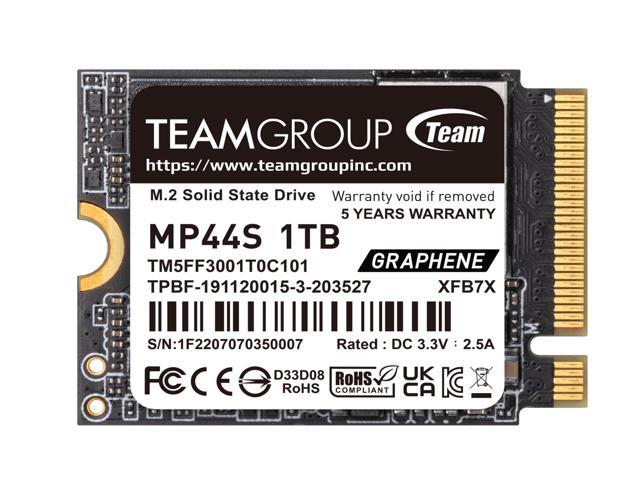
Team Group MP44S 1 TB — TM5FF3001T0C101
Start here if 1 TB covers the games you regularly keep installed. Compare its current total price with the 2 TB version before choosing.
Check: TM5FF3001T0C101 · 2230 · 1 TB. Confirm the exact handheld and required clearance.
Exact model specifications

Affiliate links. We may earn a commission from qualifying purchases.
2230 · more games installed
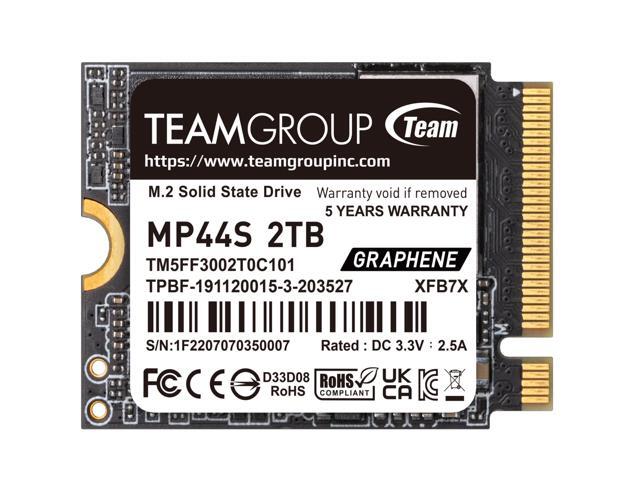
Team Group MP44S 2 TB — TM5FF3002T0C101
Consider this when 1 TB would leave you managing storage too often. The extra capacity is the reason to pay more; no game-speed advantage is assumed.
Check: TM5FF3002T0C101 · 2230 · 2 TB. Verify the selected capacity on the retailer page.
Exact model specificationsAffiliate links. We may earn a commission from qualifying purchases.
2280 · a different device format
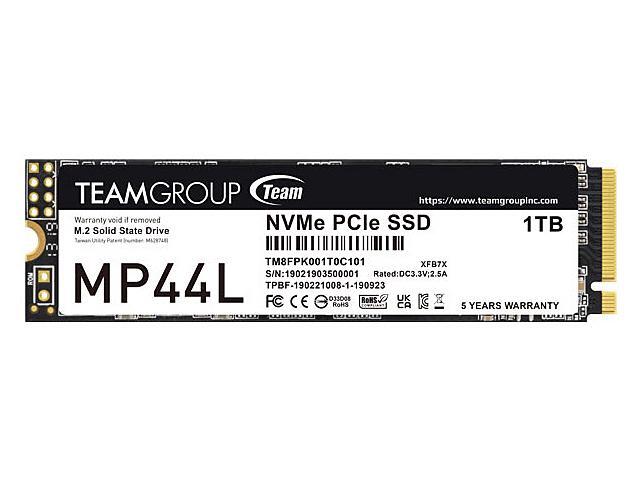
Team Group MP44L 1 TB — TM8FPK001T0C101
An existing catalogue example for a device that accepts 2280, such as the Ally X family. Compare other 2280 options if the current offer is unattractive. GPUStores has not tested this drive in those handhelds.
Check: TM8FPK001T0C101 · 2280 · 1 TB. Not for the factory 2230 slot in Steam Deck or original Ally; check the target device’s full SSD requirements.
Exact model specificationsAffiliate links. We may earn a commission from qualifying purchases.
Questions before buying
Can I buy any M.2 SSD for a Steam Deck?
No. The LCD and OLED repair guides specify a single-sided M.2 2230 drive. Check the exact SSD’s interface, dimensions and suitability; the M.2 name alone is insufficient.
Do ROG Ally and Ally X take the same drive?
The original Ally uses 2230, while Ally X uses 2280. The ROG Xbox Ally and Xbox Ally X also use 2280. Check the exact generation before reusing someone else’s shopping list.
Is the 2 TB drive automatically the better buy?
No. Compare total price, price per TB and the capacity you will actually use. Better cost per TB does not make unused space free.
Will these links always show the same price or stock?
No. Retailer offers change. Newegg blocks use the site’s refreshed offers; Amazon links open the exact product for its current terms. No fixed Amazon price or stock claim is made here.
Sources and method
Manufacturer product sheets and first-party repair guides checked September 5, 2026. Format compatibility is distinct from GPUStores testing: these are documented options, not lab-tested rankings or guarantees for every revision.
- ASUS ROG: SSD upgrade guide by Ally model
- iFixit: Steam Deck LCD SSD replacement
- iFixit: Steam Deck OLED SSD replacement
- TEAMGROUP MP44S 1 TB — TM5FF3001T0C101
- TEAMGROUP MP44S 2 TB — TM5FF3002T0C101
- TEAMGROUP MP44L 1 TB — TM8FPK001T0C101
- ASUS ROG Xbox Ally: storage format
- ASUS ROG Xbox Ally X: storage format